
















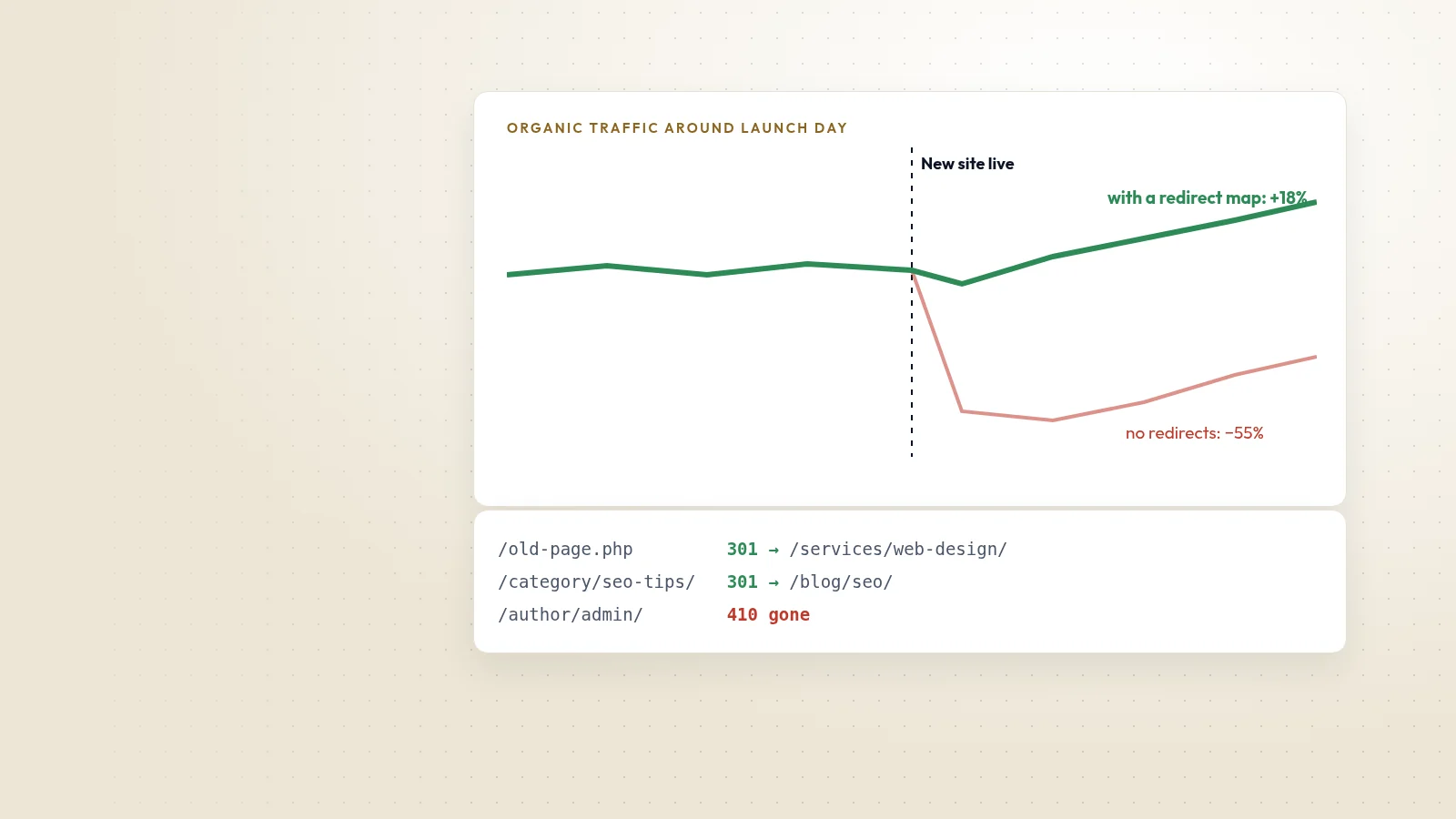
A redesign is a good moment to fix structure, speed and content. It is also the moment when many sites lose a large share of their search traffic, usually because old addresses stop working. The good news is that almost all of that loss is preventable.
1. Make an inventory of every URL
Before anything changes, collect every address the old site has: pages from the sitemap, pages that receive traffic in analytics, pages with links from other websites in Search Console, and images or PDFs that rank on their own. This list is the foundation of the migration.
2. Map old addresses to new ones
For every old URL, decide one of three outcomes:
- Redirect permanently (301) to the closest equivalent new page.
- Return 410 Gone for content that has been removed on purpose and has no replacement.
- Keep the address unchanged, which is always the safest option when the page still makes sense.
Avoid sending everything to the homepage. Search engines treat mass redirects to an unrelated page much like a missing page.
3. Test the redirects before launch
Run every old URL against the staging server and check the status code and the final destination. Look for chains (A to B to C) and loops. We keep the redirect map in version control and test it automatically on every deploy.
4. Launch with the basics in place
- Canonical tags pointing to the new addresses.
- An updated XML sitemap submitted in Search Console.
- Titles, descriptions and headings carried over or improved, not lost.
- Analytics and conversion tracking working from the first hour.
5. Watch the first eight weeks
Expect some movement for a few weeks while search engines re-process the site. Check Search Console for crawl errors and pages reported as not found, compare traffic for the top landing pages, and fix gaps quickly. Keep the redirects in place for at least a year, ideally permanently.
Backups and a way back
Finally, take a full backup of the old site and its database before switching. If anything goes wrong, you can restore it in minutes while the problem is fixed.